Skip to the rules

The rules & your first game

Xtreme
Pinball
Rules.

Play the game. Beat the clock. Learn a new way to compete in pinball, one level at a time.

A guide to Xtreme Pinball on real machines. The web app manages the competition; your group plays the pinball.

Your first ball

1:30

Make every shot count.

Spend Blue +30 seconds
Recommended beginner setup

01 / The basics

Same machine.
New challenge.

Xtreme Pinball adds time limits and optional rewards to competitive pinball.

A ball timer limits each ball. Alternatively, a game timer limits the whole game. Agree on the timer and rules before you begin.

One person acts as the Ref, managing the app on a phone or tablet while another player plays. Players usually take turns being the Ref.

For a goal-based game, the Ref stops the timer when the goal is reached. For timed play, the player must stop flipping when time runs out.

02 / Know your coins

Time. Points.
Prizes.

Blue / Time

Say “Spend Blue!” to the Ref to spend an available Blue coin. The Ref applies it, immediately adding 30 seconds to the active timer.

Spend before time runs out. Typically, only one Blue coin may be spent per ball; the tournament director decides the limit.
Gold / Points

Gold coins represent points. The player with the most Gold coins wins the Xtreme competition.

With XP rules enabled, players can earn rewards during play. The selected rules define those rewards.

Purple / Prizes

Purple coins are for optional bonus challenges and prizes.

Use them when your group wants an extra challenge. They are not required to learn the basic timer game.

03 / Getting started

Start simple.
Build up.

Learn one layer at a time. These three learning stages are different from the individual player levels used for handicaps in stage three.

01

Ball timers

XP Rules OFF
XP Levels OFF

Get comfortable playing against the clock before adding extra rules.

  • Each player starts with 3 Blue coins.
  • Start each normal ball with 90 seconds; start extra balls with 30 seconds.
  • The Ref starts and manages the timer while the current player plays.
  • Spend a Blue coin for 30 extra seconds, before the timer expires.
  • Stop flipping when time runs out. Agree on the per-ball Blue coin limit before play.

This is the recommended beginner setup. Other timer settings can be used once your group is comfortable.

02

Xtreme rules

XP Rules ON
XP Levels OFF

Add simple game-specific rewards and penalties.

  • Time rewards immediately change the active timer.
  • Point rewards are added to the player's final score.
  • Coin rewards can award Blue, Gold, or Purple coins.
  • Negative time or point rewards are penalties.
  • The Ref records each occurrence using the rule counters in the app.

Review the selected game's rules with everyone before starting. The play screen shows its Game Rules; a game may have no special rules configured.

03

Player levels

XP Rules ON
XP Levels ON

Add player-level handicaps to help balance the competition.

  • Player levels can determine timer lengths; novice players may get longer ball timers.
  • Rules and rewards may apply to specific levels.
  • Starting Blue and Gold coin counts may vary by level.

Set and explain each player's level before playing so everyone knows which settings apply.

04 / The Ref's checklist

One plays.
One refs.

The Ref keeps the app and the game in sync. Rotate the role as players change.

  1. Prepare the ball.Check the player, game, ball number, timer, and applicable rules.
  2. Start the timer. Say “GO!”Coordinate the start with the player.
  3. Count rules as they happen.Record each reward or penalty occurrence in the app. Accurate counts matter.
  4. Apply “Spend Blue.”If the player has a coin and the agreed limit allows it, add 30 seconds before expiry.
  5. Watch the finish.Stop the timer when a goal is reached. If time expires, tell the player to stop flipping. Give countdown notices if the group agreed to them.
  6. Record the result.Enter final scores or positions for the game, then prepare the next player.

05 / The app, step by step

Your first
Quick Tournament.

Sign in and open Play Xtreme Pinball. A first-time tournament comes with sample players and games to make setup easier. Replace them with your group and the machines you will play.

Real screens from an example Quick Tournament. Tap any image to open it at full size. These show the Xtreme format; Golf and Bowling have their own scoring.

01

Choose your players

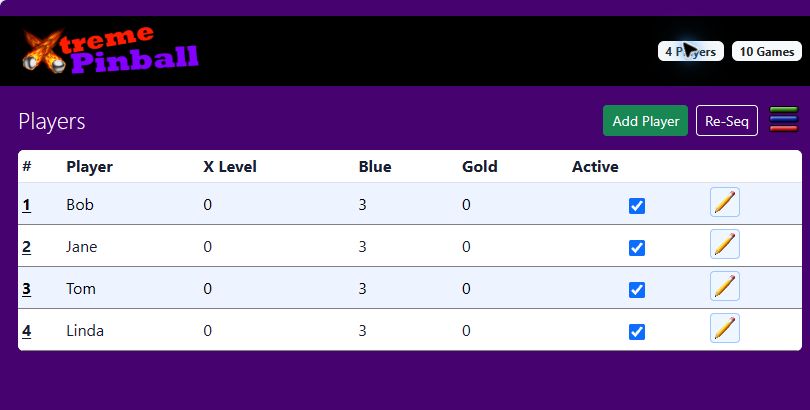
Open Players, or use the player-count button at the top. Edit Bob, Jane, Tom, and Linda to match your group, or add your own players.

For your first game, leave player-level handicaps off. Decide who will Ref the first ball.

Players screen with Bob, Jane, Tom and Linda, three Blue coins each, and Edit buttons.
Players: names, player levels, starting coins, and active players.
02

Choose your games

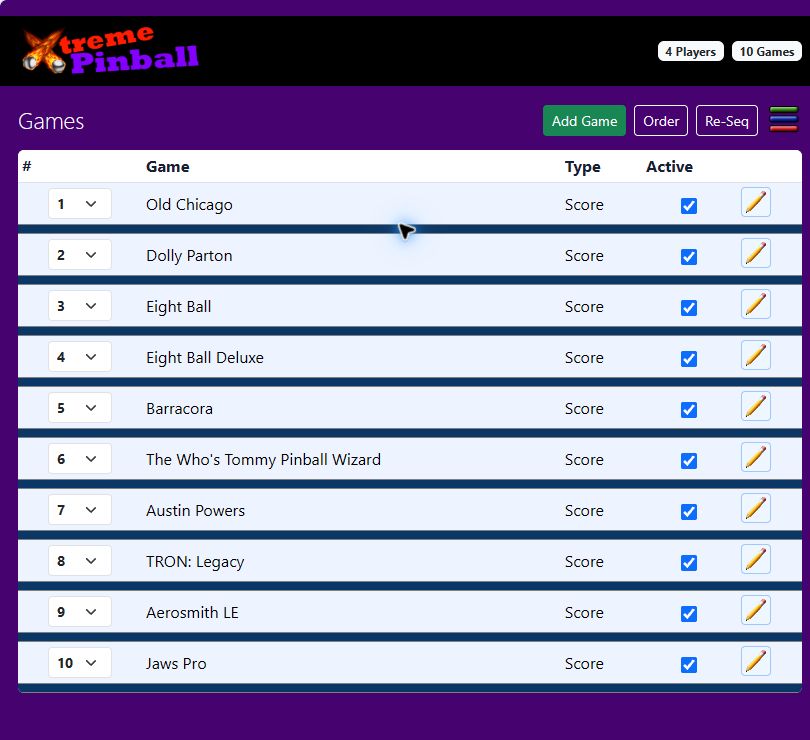
Open Games, or the game-count button. Add and edit games to match the machines available to your group.

Use the position controls to arrange the order. Review each game's setup before play.

Games screen listing starter machines with position selectors, active checkboxes and Edit buttons.
Games: a starter list you can customize, not a required machine lineup.
03

Set the challenge

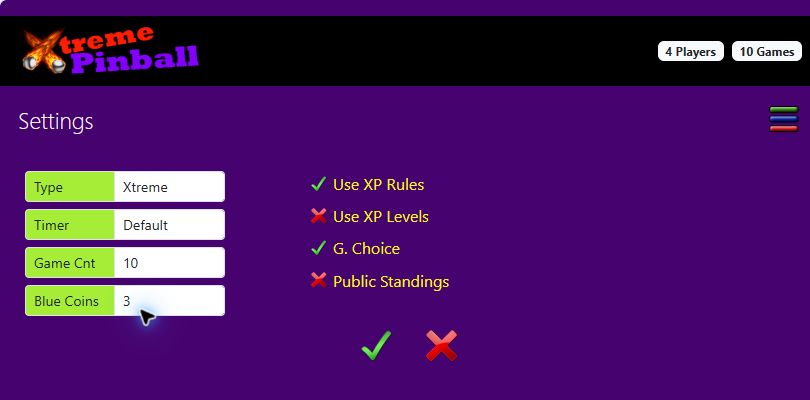
Open Settings. Choose Xtreme, your timer, and starting Blue coins.

For learning stage one: turn Use XP Rules OFF and Use XP Levels OFF, use a 90-second ball timer, and start with three Blue coins. Agree on extra-ball timing and the per-ball spending limit.

The example screenshot shows XP Rules ON and XP Levels OFF—the stage-two combination. Change these switches to suit your group.

Settings screen showing Xtreme type, Default timer, three Blue coins, Use XP Rules on and Use XP Levels off.
Settings: pick the format and timer, then choose how many rule layers to use.
04

Play with a Ref

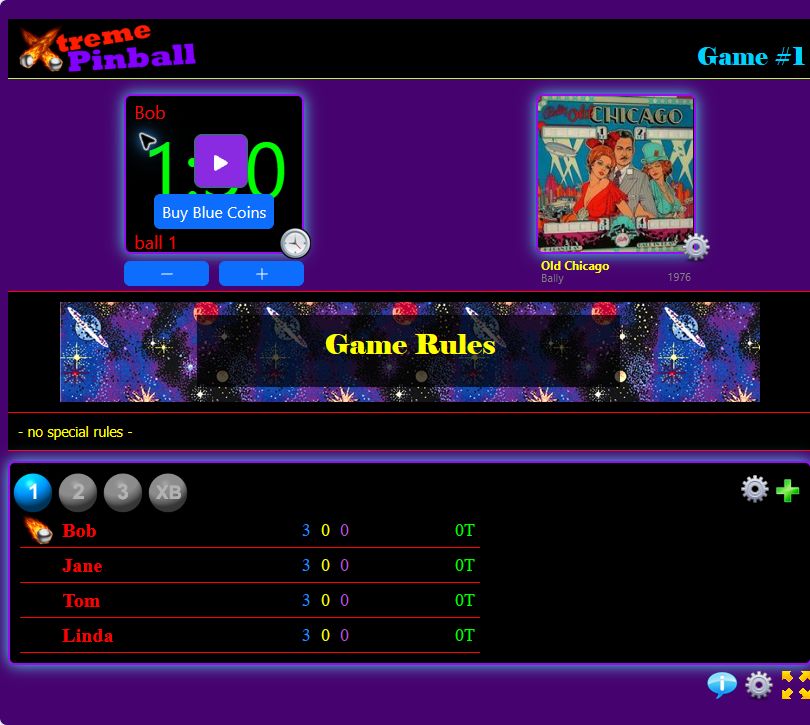
Open Tournament. Confirm the current player, machine, and ball. The Ref starts the timer, applies Blue coins when requested, and records rules as they happen.

After the ball or game, record the result. Use Standings to review the competition.

This example is Bob's first ball on Old Chicago. It shows 1:30 remaining and no special rules configured for that game.

Xtreme play screen with Bob selected, a 1:30 timer, Buy Blue Coins control, Old Chicago, Game Rules and player coin counts.
Play: the timer, game rules, selected ball, and players together in one view.

06 / Ways to play

Start with
your group.

Local / Quick Tournament Available now · Beta
A single group plays together. Start with timers, then add XP rules and player levels as you learn.
Challenge Upcoming
A format for potentially many players, without groups and with fewer rules.
Full tournament Coming soon
Multiple groups and rounds. Full-scale tournament management is planned for Pinball Playoffs.

VPX cabinet challenges and tournaments are also upcoming. They are not required for today's local web play.

Know the rules. Try the beta.

Ready?
Say “GO!”

Questions or suggestions? Signed-in members can use Send Feedback in the menu.

Start a Quick Tournament